EZTrimmer
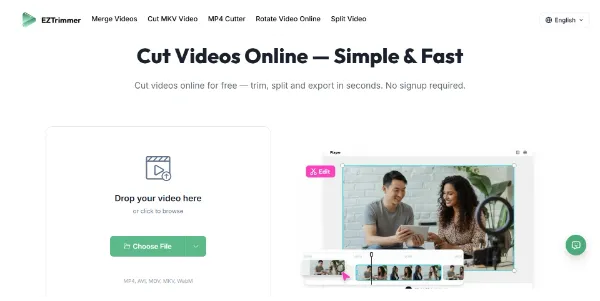
EZTrimmer 是一款旨在优化 Video Editing 工作流程的顶级人工智能工具。
相关AI工具

VidTranslate
AI-powered tool for easy video translation, subtitling, and dubbing in over 100 languages for global audiences.

TubeRepeat
TubeRepeat is a free online tool for looping and repeating YouTube video segments with A-B precision and variable speed.
Wistia Remix
AI-powered video editor that transforms raw footage into polished, multi-source videos through conversational commands.

CinLink
CinLink is an AI-powered video editing tool that transforms natural language instructions into complete media workflows for creators and businesses.

AI Video Editor
AI Video Editor is a prompt-based tool for editing video clips with AI, offering features like object removal, product recoloring, and visual style changes.

iLikeIMG
iLikeIMG offers 90+ free AI tools online for photo and video editing, enhancement, and generation without installation.

Music Remover
AI-powered tool to remove background music from audio and video, separating vocals, music, and other sounds.
LTX 2.5
LTX 2.5 is an all-in-one creative studio for AI video production, designed for creative teams, marketers, and filmmakers.
Allows users to cut, trim, and split video files directly within their web browser, eliminating the need for software installation.
Users can access and utilize the video editing functionalities instantly without the need to create an account or log in.
The platform operates without displaying advertisements, providing an uninterrupted user experience.
Exported video files are free from any branding watermarks, preserving the original content's integrity.
Users can precisely select specific frames on an intuitive timeline to remove unwanted sections for a clean, professional finish.
The tool supports a wide array of popular video formats for both upload and export, including MP4, AVI, MOV, MKV, and WebM.
Utilizes an optimized engine to process and cut videos quickly, allowing for rapid export in seconds.
Ensures user data privacy by securely processing uploaded videos and automatically deleting them from servers once finished.
详细定价信息
- Completely free to use with no hidden costs.
- No sign-up or account creation required for immediate use.
- Exports videos without watermarks or ads.
- Maintains original video resolution and quality during processing.
- Supports a wide range of popular video formats (MP4, AVI, MOV, MKV, WebM).
- Offers a simple, intuitive drag-and-drop interface for ease of use.
- Fast processing speeds for quick video edits.
- Limited to a maximum file size of 500MB.
- Limited to a maximum video length of 30 minutes.
- Primarily focused on cutting and trimming, lacking advanced video editing features like effects or transitions.
Is EZTrimmer really free?
Which video formats can I use?
How secure is my data?
What is the file size limit?
Do I need an account to start?
相关主题
发表评价
社区反馈 (0)
准备好试用 EZTrimmer 了吗?
VidTranslate
AI-powered tool for easy video translation, subtitling, and dubbing in over 100 languages for global audiences.
TubeRepeat
TubeRepeat is a free online tool for looping and repeating YouTube video segments with A-B precision and variable speed.
Wistia Remix
AI-powered video editor that transforms raw footage into polished, multi-source videos through conversational commands.
CinLink
CinLink is an AI-powered video editing tool that transforms natural language instructions into complete media workflows for creators and businesses.
AI Video Editor
AI Video Editor is a prompt-based tool for editing video clips with AI, offering features like object removal, product recoloring, and visual style changes.
iLikeIMG
iLikeIMG offers 90+ free AI tools online for photo and video editing, enhancement, and generation without installation.
Music Remover
AI-powered tool to remove background music from audio and video, separating vocals, music, and other sounds.
LTX 2.5
LTX 2.5 is an all-in-one creative studio for AI video production, designed for creative teams, marketers, and filmmakers.